Free · Windows · No account · No ads

Your TV remote,
on your PC.

Couch remote dead again? Control your TV from your computer — full remote, keyboard shortcuts, one-click channels, type into search boxes, and a live now-playing view. It never phones home; it only talks to your TV.

Roku fully supported · Samsung, LG, Vizio & Google TV in beta

OKDownload free
Windows · 14 MB

Unzip → run RokuRemote.exe → it finds your TV.

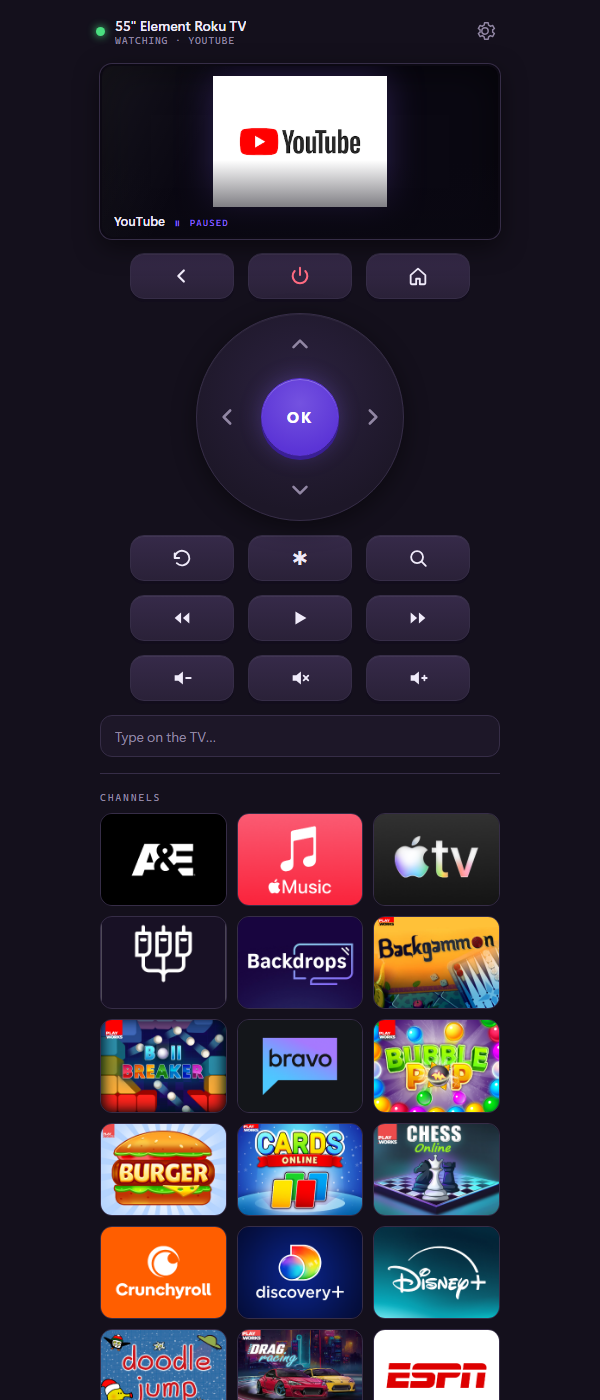
The remote: a dark purple app with a D-pad, playback and volume buttons, a live view of what the TV is playing, and a grid of channel icons.
Setup

Three steps, ten seconds

1 · Download & unzip

Grab the zip, right-click → Extract All. No installer, nothing touches your system.

2 · Run RokuRemote.exe

If Windows SmartScreen appears, click “More info” → “Run anyway” — it's just an unsigned free app.

3 · Done

Same Wi-Fi as your TV? Roku is found automatically. Other brands: pick their tab, scan, and pair once (the TV shows a prompt or code).

Features

Everything the phone app does, on a real keyboard

Full remotePower, home, back, D-pad, options, replay, play/pause, rewind, fast-forward, volume, mute.
Keyboard shortcutsArrows to navigate, Enter for OK, Esc for back, Space to pause, +/− for volume, M to mute.
Type on the TVPress / and type — every keystroke goes straight into the TV's search box. No more arrow-key hunt-and-peck.
Now playingA mini screen shows the channel that's on, paused or playing, with a progress bar.
One-click channelsEvery channel on your TV in a grid with real icons, plus a Recent row for the ones you actually use.
Wakes a sleeping TVThe power button can wake the TV even from deep sleep.
Five brands, one appTabs for Roku, Samsung, LG, Vizio and Google TV. Each remembers its own TV and pairing.
Questions

FAQ

Is it really free?

Yes. Free forever, no ads, no account, no “pro version”, no tracking. It was built out of spite for the remote apps that charge for a volume button.

Why is it a download and not just a webpage?

Browsers block websites from talking to devices on your home network — that's a good security rule, but it means no webpage can control your TV. The small app runs on your PC, inside your network, so it can. That's also how the official Roku app works.

Windows says it “protected your PC”?

SmartScreen warns about any new unsigned app. Click “More info”, then “Run anyway”. The app makes zero internet connections — it only speaks to your TV over your own Wi-Fi. Don't take our word for it: point any network monitor at it.

Which TVs work?

Roku TVs and players are fully supported and tested. Samsung (2016+), LG webOS, Vizio SmartCast, and Google TV / Android TV are in beta — the remote works, but expect the occasional rough edge and tell us what breaks. Roku gets the extras (channel grid, now-playing view, live typing); other brands get the full button remote, channel rocker, and pairing.

What do I need?

Windows 10 or 11 and a TV on the same network. Roku: “Control by mobile apps” enabled (it is by default). Samsung/LG: accept the Allow prompt the TV shows when you pair. Vizio/Google TV: type the code the TV shows when you pair.

It can't find my TV

Open the gear icon and hit Rescan. Still nothing? Some routers block device discovery between Wi-Fi devices (“AP isolation” or a guest network) — put the PC and TV on the same main network.

Can it show the actual TV picture?

No app can — Roku doesn't stream its screen over the network (DRM), which is why even the official app doesn't show it. The now-playing panel shows the channel, state, and progress instead.